Thursday, 18 September 2008
Wednesday, 17 September 2008
Data Quality - Data Cleanse
Data Cleanse transform: identifies and isolates specific parts of mixed data, and standardizes your data based on information stored in the parsing and capitalization dictionary files, business rules defined in the rule file, and expressions defined in the pattern file.
International data
Define paths for dictionaries : By default, the Data Cleanse dictionary files are installed to the reference_data folder under your Data Quality installation location.
Scan and Split : Scan and Split is a specialized Formatter transform that allows you to split your
field data into two or even three parts to better isolate names or other data from
within complicated fields.
Search and Replace:For some less complex data manipulation tasks where speed is a priority, you can use the Search fand Replace transform. When you use Search and Replace, you
can search for:
- Parse data: transform can identify and isolate a wide variety of data.
- Standardize data: The Data Cleanse transform can standardize data to make your records more consistent , include case, punctuation, and acronyms.
- Assign gender and pre-names : The Data Cleanse transform can assign a precise gender code to each name - strong male, strong female, weak male, weak female, and ambiguous. For dual names, Data Cleanse also offers additional gender codes—female multi-name,
male multi-name, mixed multi-name, and ambiguous multi-name. - Create personalized greetings
- Create a separate output record for each person :If you expect that you have multiple persons, firms, e-mail addresses, and so on in a single record, you may want to split that data out into separate records.
- Data_cleanse: The base Data Cleanse transform that includes a minimal set of options.
- data_cleanse_en, fr, etc
- Blueprint :
- Batch address and data cleanse blueprint
- Transactional address and data cleanse blueprint
- Scan and Split
- Search and Replace
International data
- Customize greetings and prenames per country :
- Modify the phone file for other countries :Data Cleanse includes phone number patterns for many countries by default. However, if you find that you need parsing for a country that is not included, you can modify the international phone file (drlphint.dat 一个正则表达式file) to enable Data Cleanse to detect phone number patterns that follow a different format.
- The pattern label is created in the drludpm.dat (regular expressions)file when the pattern is defined.
- For more, refer BusinessObjects Data Quality XI Release 2 Data Cleanse Modifier’s Guide
- The parsing dictionary identifies and parses name, title, and firm data.The parser looks up words in the parsing dictionary to retrieve information. The parser then uses the dictionary information, as well as the rule file, to identify and parse name, title, and firm data.
Define paths for dictionaries : By default, the Data Cleanse dictionary files are installed to the reference_data folder under your Data Quality installation location.
Scan and Split : Scan and Split is a specialized Formatter transform that allows you to split your
field data into two or even three parts to better isolate names or other data from
within complicated fields.
Search and Replace:For some less complex data manipulation tasks where speed is a priority, you can use the Search fand Replace transform. When you use Search and Replace, you
can search for:
- a substring
- a word
- the entire contents of a field
- Convert coded data
- Search and replace
- Internal vs. external search and replace values
- Leading and trailing spaces
- Search order: Search table entries are sorted only by the number of characters in the search value. If there are multiple entries of the same length, they are not sorted further. This means that the transform will search for and replace the longest values first, followed by any shorter values.
- Quick Replace.
Data Quality - Address cleansing
Address cleansing: gives you back a corrected, complete, and standardized form of your original address data.
- Verify that the locality, region, and postal codes agree with one another. If you have just a locality and region, the transform usually can add the postal code and vice versa (depending on the country).
- Standardize the way the address line looks. For example, it can add or strip punctuation or abbreviate or spell-out the primary type (depending on whatyou want).
- Identify any undeliverable addresses, such as vacant lots, condemned buildings, and so on (USA records only).
- Assign diagnostic codes to help you find out why addresses were not assigned or how they had to be corrected. For a listing of these codes for the Global Address Cleanse transform and the USA Regulatory Address Cleanse
- Multiline
- Discrete
- Hybrid
- Parsed address components, which correspond to the input fields, such as locality, region, and postal code.
- Best address components, which are processed data standardized according to the options set in the transform.
- Information about whether any data was changed, added, used, or not used in a corrected component.
- Global Address Cleanse and plugins: Must with plugins Australia, Canada, Japan, Multi Country, or USA
- USA Regulatory Address Cleanse: DPV, eLOT, EWS, GeoCensus, LACSLink, RDI, suggestion
lists (not for certification), and Z4Change. With this transform you can create a USPS Form 3553. - Global Suggestion Lists : Offers suggestions for possible address matches for your global address data.
- Country ID Identifies the country of destination for the record and outputs an ISO code.
- Directories
- Substitution files
Tuesday, 16 September 2008
Data Quality - Core Concept
Project:Data Flow project.3 types of Projects(主要区别其实就是Reader & Writer的不同)
Compound Transform: A compound transform is a combination of transforms that show up as a single entity on the canvas.
Plugin: A plugin is a special kind of transform. A plugin must always be associated with
a transform of a specific type, or to an entire project.
Shared options: Transforms are made up of various files and subcomponents. With shared options, you can define a set of options for a given transform type, and then reuse those options among all transforms of that type.
Substitution variables: allow you to define a variable and a value for that variable.
Dataflow objects: are all of the things you just read about, includes projects, transforms, compound transforms, shared options, and so on.
Basic hierarchy of Data Object

Level of Data Objects
You will find more details from reference object panel in DQ.
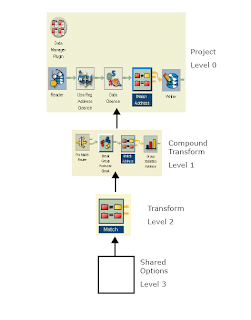
Note: The override & reuse concept between different levels needs more attention and further reading..
Data record: A data record is a row of data.The data record is constructed at runtime.
Data collection:A data collection is a group of data records. Early in the dataflow process, a fixed number of data records are grouped into data collections. Later, in preparation for
the matching process, a variable number of data records are grouped into data collections of candidate matches. Finally, in the matching process, data records are split into data collections of matching records and uniques.
Data collections in the Reader transform : read at the same time and pass to next transform.
Data collections in the Match transform :The Match transform then receives the new data collections of potential matches one at a time and compares them, and then splits the data collections again into groups of matching and unique data records.
Data collections after the Match transform: All of the transforms downstream from the Match transform operate on the new match or unique data collections one at a time.
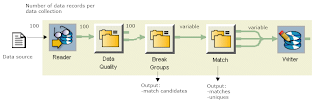
Low_Watermark and High_Watermark : Performance usage and to sync speed between each other.
Transactional project rules and tips:
field_type.transform_type.class.parent_component.field_name
Filed overlapping is important!
- Batch: A project run using batch processing. Batch processing executes a series of non interactive projects all at one time. Batch processing is particularly useful for operations that require the computer or a peripheral device for an extended period of time. Once batch processing begins, it continues until it is done or until an error occurs.The new project is based on the newproject_batch.xml file, and opens with a Data Manager plugin.
- Transactional : A project run using transactional processing. Transactional processing usually processes one record at a time. Transactional processing is accomplished with the Data Quality web service. The new project is based on the newproject_transaction.xml file, and opens with transactional Reader and Writer transforms and a Data Manager plugin.
- Integrated Batch: A project run using batch processing with an Integrated Batch Reader and an Integrated Batch Writer transform. This type of project can be used to pass data to and from an integrated application, including BusinessObjects XI Data Integrator Release 2. The new project is based on the newproject_integratedbatch.xml file, and opens with integrated batch Reader and Writer transforms and a Data Manager plugin. (可以为DI整合)
Compound Transform: A compound transform is a combination of transforms that show up as a single entity on the canvas.
Plugin: A plugin is a special kind of transform. A plugin must always be associated with
a transform of a specific type, or to an entire project.
Shared options: Transforms are made up of various files and subcomponents. With shared options, you can define a set of options for a given transform type, and then reuse those options among all transforms of that type.
Substitution variables: allow you to define a variable and a value for that variable.
Dataflow objects: are all of the things you just read about, includes projects, transforms, compound transforms, shared options, and so on.
Basic hierarchy of Data Object
Level of Data Objects
You will find more details from reference object panel in DQ.
Note: The override & reuse concept between different levels needs more attention and further reading..
Data record: A data record is a row of data.The data record is constructed at runtime.
Data collection:A data collection is a group of data records. Early in the dataflow process, a fixed number of data records are grouped into data collections. Later, in preparation for
the matching process, a variable number of data records are grouped into data collections of candidate matches. Finally, in the matching process, data records are split into data collections of matching records and uniques.
Data collections in the Reader transform : read at the same time and pass to next transform.
Data collections in the Match transform :The Match transform then receives the new data collections of potential matches one at a time and compares them, and then splits the data collections again into groups of matching and unique data records.
Data collections after the Match transform: All of the transforms downstream from the Match transform operate on the new match or unique data collections one at a time.
Low_Watermark and High_Watermark : Performance usage and to sync speed between each other.
Transactional project rules and tips:
- One collection in, one collection out :Every record in the collection passes (or fails) the conditions set up in the Filter transform, and the collection is sent to only one output pipe.
- Transactional Writer:You can only have one transactional Writer in a
transactional dataflow. - Aggregator transform: You cannot use an Aggregator transform in a transactional project. This transform’s task is to create collections based on criteria you select. In a batch project, there is a finite number of records and the Aggregator knows when the records stop coming. In a transactional environment, the project is left “open,” and therefore the transform would always be waiting for more records.
- Sorter transform: You can use a Sorter transform if you make sure that the Sort_Mode option is set to Collection_Sort.
- Flat files. If you are writing to a flat file, this file remains open until the transactional project is closed. Therefore, you may not be able to use this file if the project is still open.
- Batch Writers. You may find it useful to include a batch Writer in your transactional project to write to your database. You can route data from the transactional Writer to the batch Writer to save time in the future by allowing you to write to your database immediately after a transaction has occurred.
field_type.transform_type.class.parent_component.field_name
Filed overlapping is important!
Data Profile 1
(From Wikipedia)
Data profiling is the process of examining the data available in an existing data source (e.g. a database or a file) and collecting statistics and information about that data. The purpose of these statistics may be to:
Typical types of metadata sought are:
Data Profile need to be understood the data before creating an ETL process
Data profiling is the process of examining the data available in an existing data source (e.g. a database or a file) and collecting statistics and information about that data. The purpose of these statistics may be to:
- Find out whether existing data can easily be used for other purposes
- Give metrics on data quality including whether the data conforms to company standards
- Assess the risk involved in integrating data for new applications, including the challenges of joins.
- Track data quality.
- Assess whether metadata accurately describes the actual values in the source database.
- Understanding data challenges early in any data intensive project, so that late project surprises are avoided. Finding data problems late in the project can incur time delays and project cost overruns.
- Have an enterprise view of all data, for uses such as Master Data Management where key data is needed, or Data governance for improving data quality
Typical types of metadata sought are:
- Domain: whether the data in the column conforms to the defined values or range of values it is expected to take
- for example: ages of children in kindergarten are expected to be between 4 and 5. An age of 7 would be considered out of domain
- A code for flammable materials is expected to be A, B or C. A code of 3 would be considered out of domain.
- Type: Alphabetic or numeric
- Pattern: a North American phone number should be (999)999-9999
- Frequency counts: most of our customers should be in California; so the largest number of occurrences of state code should be CA
- Statistics:
- minimum value
- maximum value
- mean value (average)
- median value
- modal value(mode)
- standard deviation(误差)
- Interdependency:
- Within a table: the zip code field always depends on the country code
- Between tables: the customer number on an order should always appear in the customer table
- Column Profiling (Including the statistics and domain examples provided above)
- Dependency Profiling, which identifies intra-table dependencies. Dependency profiling is related to the normalization of a data source, and addresses whether or not there are non-key attributes that determine or are dependent on other non-key attributes. The existence of transitive dependencies here may be evidence of second-normal form.
- Redundancy Profiling, which identifies overlapping values between tables. This is typically used to identify candidate foreign keys within tables, to validate attributes that should be foreign keys (but that may not have constraints to enforce integrity), and to identify other areas of data redundancy. Example: redundancy analysis could provide the analyst with the fact that the ZIP field in table A contained the same values as the ZIP_CODE field in table B, 80% of the time.
Data Profile need to be understood the data before creating an ETL process
- Check for missing values (NULL)
- Get possible list of values
- Visualize the data distribution
- Find patterns
- Get data ranges (min, max, average) – identify data domain outliers
- Uniqueness of data (distinct values)
- Referential integrity – understand relationships
- Efficient, effective, data investigation
- Interface designed for business users
- Automated Summary Analysis and ref. integrity testing
- Flexible and comprehensive column validation
- Business rule auditing
- Scheduling, trend analysis and continuous monitoring
- Alert triggering and notification
- Flexible reporting: PDF, XML, MS Word, Excel, etc.
- Communicate business rules to data cleansing user
Wednesday, 10 September 2008
taobao招聘要求
基础扎实,做事认真,善于总结,有想法,能承受压力,有一技之长就行。
总结很精辟。:)
有兴趣的看链接~~
http://rdc.taobao.com/blog/dba/html/203_taobao_jobs_2009.html
总结很精辟。:)
有兴趣的看链接~~
http://rdc.taobao.com/blog/dba/html/203_taobao_jobs_2009.html
Data Quailty: A survival guide for marketing
http://www.businessobjects.com/product/im/data_quality.asp
DUPLICATE ACCOUNT RECORDS

DQ 9 functions

Data Quality Architecture

Typical Data Problems in a Marketing Campaign
DUPLICATE ACCOUNT RECORDS
- 8:1 duplication ratio between customer records.
- Potential reasons: Mergers and acquisitions (M&A) ;
- Account managers;
- Poor visibility and linkage across systems.
- Deliver the message is impacted.(Crucial Information: address, email, or phone number field) [Y: Report related]
- Segment prospects into the correct categories or demographics is impacted.(Title, salutation, job code, or ethnicity) [Y: Dimention depends]
- Identify similar or related records across systems (Social security, account number, log-in ID, or account name ) [Y: PK related identifier]
- NO-ontime update
- System migrations
- Fraud
- The scope and depth
- The cause of the defects
- Many data quality problems are processed-based.
- reporting of the findings.
- The best place for direct marketers to cleanse their data is as close to the point of creation as possible.
- Transactional updates–often at the point of creation.e.g. Web Site. Use real-time processing,respond in milliseconds, and also be able to service multiple transactional applications.
- Operational feeds–upstream and before the data enters your system. Use batch-oriented data quality functions;utilizes a predefined cleansing job;scheduled to run automatically on a specific data flow
- Purchased data–if you’re buying it, demand that it is clean.Validating purchased data;matching the purchased data against your current data set.
- Legacy migration–data is in the enterprise, but not in your system yet.
- Regular maintenance–as your data ages, you need to cleanse it.
DQ 9 functions
Data Quality Architecture
- Data Quality Repository
- Configuration rules: transforms, blueprints, substitution files etc.
- Data examples: sample data used with blueprints
- Runtime metadata: log files etc.
- Data Quality Server: host Data Quality engine.
- Metadata Repository: a relational database used by the Data Quality Server and Project Portal. This database contains statistics and samples generated by running projects.
- Data Quality Project Architect: a graphical user interface used to create projects.
- Data Quality Command Line: a command line utility used to run projects.
- Integration SDK: an Integration API written in C++ and Java that allows you to create socket connections for direct interaction with the Data Quality Server, without need for the web services.
- Data Quality Documentations
- Web Tools
- Data Quality Web Service: the mechanism used to send and receive data between your application and the Data Quality Server.
- Data Quality Web Service Samples
- Data Quality Project Portal: a web-based tool that is designed to provide you with one environment for manageable administration of your processes.
- Web services
- Integration SDK
- JAVA API
- C++ API
- Socket
Subscribe to:
Posts (Atom)